 Portraits
 199+ prompts, free to copy
✨ Quick Overview: Best for crafting motion blur portrait imagery, especially featuring a sharp face, subtle movement, natural light, realistic motion trails, and editorial energy.. Works well with Gemini, Midjourney, ChatGPT.
💡 Pro tip: Attach a well-lit front-facing reference photo to anchor facial landmarks before experimenting with wardrobe changes.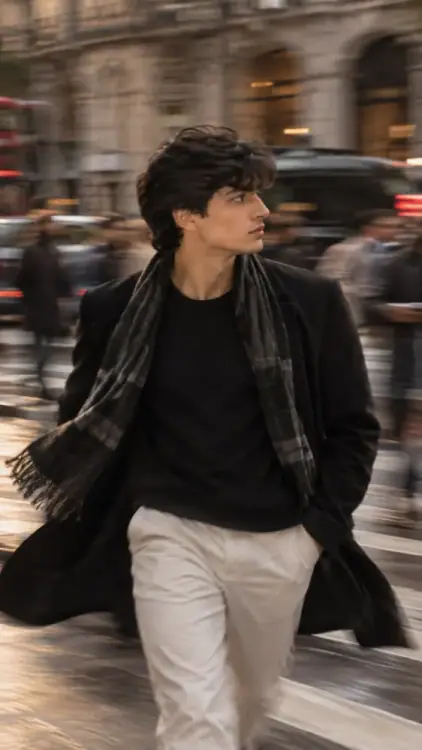
Produce a photorealistic portrait with the focal point being the face and eyes of the individual. Create a portrait with motion blur in the clothing and background elements. Utilize natural light to produce the portrait. Adhere to the common errors associated with shutter behavior and composition similar to that of an editorial photo. In relation to any reference photo, maintain the identity and the features of the person, though change the style of the photo.Motion Blur Portrait AI Prompt with a sharp subject, subtle movement trails, and realistic editorial energy.
| Compatible Models | Gemini, Midjourney, ChatGPT |
|---|---|
| Aspect Ratio | 4:5 (Instagram Portrait / Feed) |
| Lighting Setup | Soft directional portrait lighting with true-to-life skin tones and natural depth |
| Camera & Lens | 85mm professional portrait prime, f/1.8 aperture, crisp subject focus & shallow depth of field |
| Style & Category | Portraits, ChatGPT, Gemini, Instagram |
| Aesthetic & Mood | High-fashion editorial flair with bold styling and curated studio contrast |
Tested and verified for Gemini, Midjourney, ChatGPT.
Open ChatGPT, Gemini, or your preferred AI image generator and attach a clear, high-resolution photo of yourself.
Copy the full prompt above and paste it directly into your chat, keeping the motion blur portrait parameters intact.
The embedded face-reference cues guide the model to maintain your genuine bone structure, eye shape, and skin tone in the new scene.